
You are not slow. You are practising the wrong thing. Most people who’ve been practising for months without improving are drilling the skill they already have.
Typing speed isn’t one skill. It’s four stacked on top of each other – knowing where the keys are, controlling errors, holding a rhythm, and reading ahead of your fingers.
Only one of them is your bottleneck right now. The other three are fine.
That’s why generic tip lists fail. like Keep your fingers on the home row is exactly right at 25 WPM and useless at 65. Spend six months on the wrong drill and you’ll gain nothing.
Getting from 40 to 70 WPM takes most people two to three months at 15 focused minutes a day. The trick is spending those minutes correctly.
So, let’s find out your problem and it’s solution!
Get a Number You Can Trust
Before you change anything about how you type, take a test. Most people benchmark themselves badly, then wonder why the number swings 15 WPM between attempts.
A “word” in any typing test means five characters, including spaces. That’s the standard, which is why your score doesn’t depend on whether you’re typing cat or responsibility.
But the raw WPM is only half the result. The number next to it – accuracy – decides what that speed is actually worth.
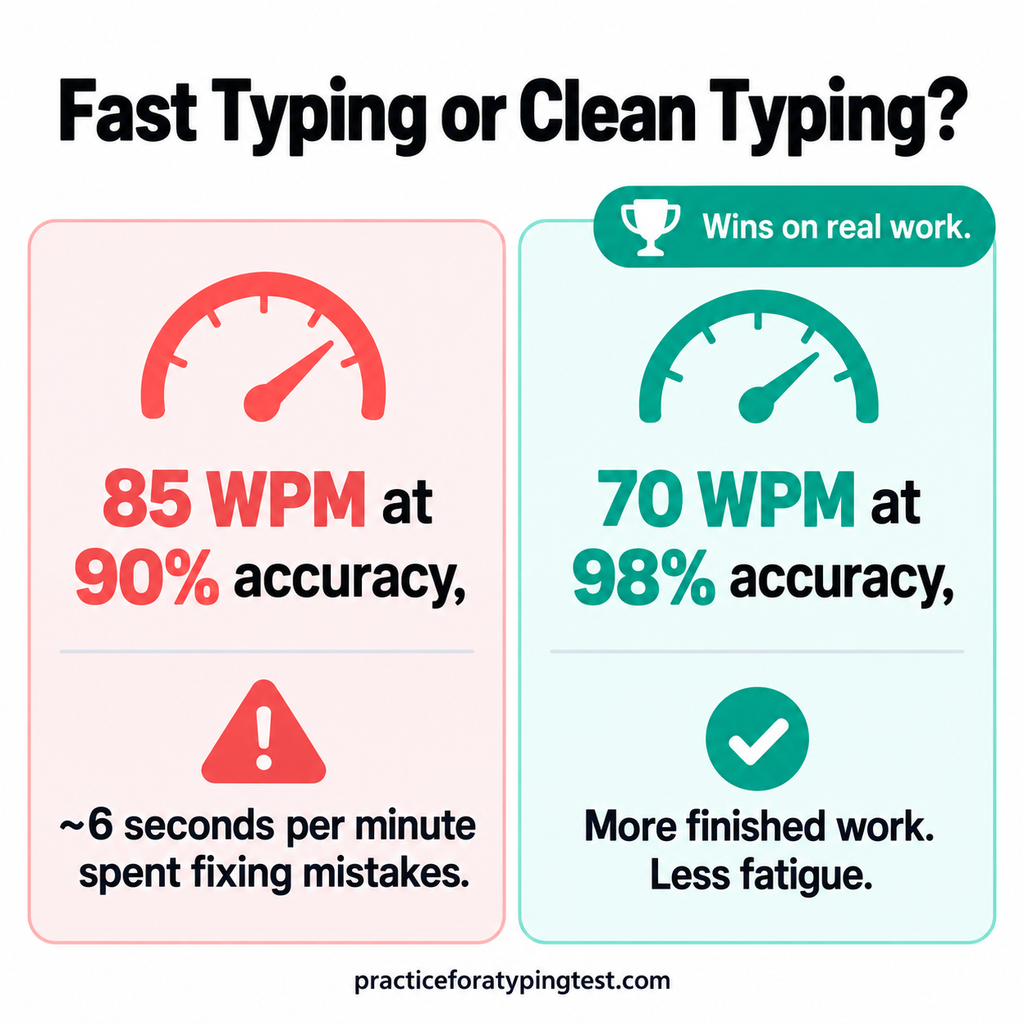
Type 100 WPM at 90% accuracy and you’re burning roughly six seconds of every minute finding and repairing mistakes.
Your real output, what typists call effective WPM, sits well below what the screen just showed you. A steady 70 WPM at 98% beats a jumpy 85 at 90% on finished work, and it’s far less tiring over an eight-hour day.
Take three one-minute tests, not one. Use the middle score. Write down both numbers.
Take the free typing test → – one minute, no signup. Come back with your WPM and accuracy.
Here’s how to read what you get:
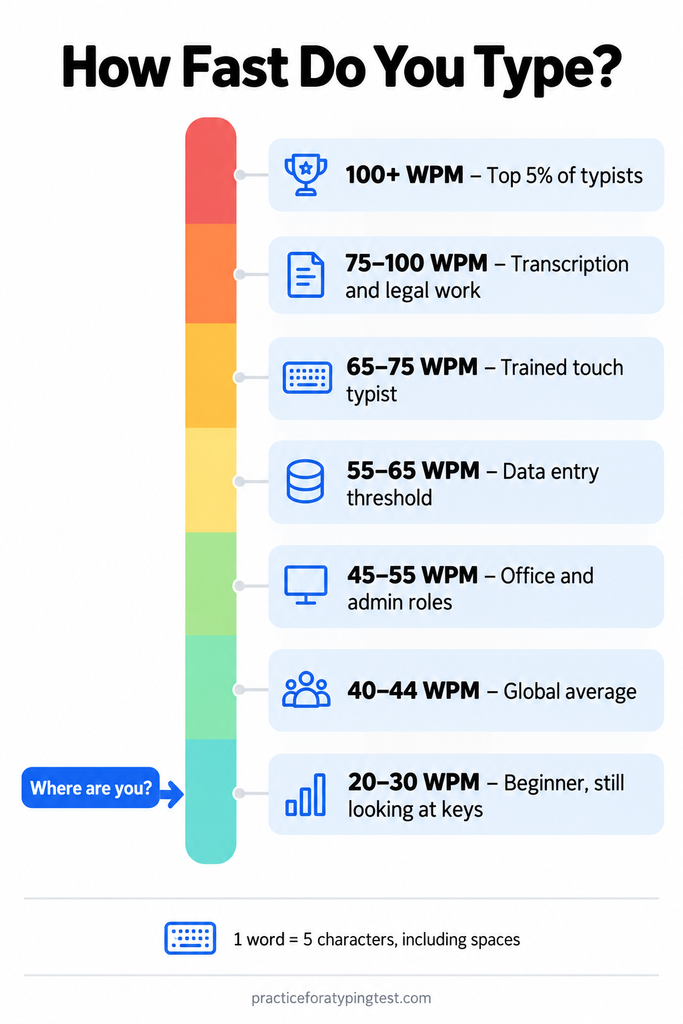
One warning about the number you just got. If you took your test on a passage you’d seen before, it’s inflated – practised text can add 20 WPM or more.
Test on fresh text every time, and always at the same time of day. Your speed genuinely drops when you’re tired.
Why You’re Stuck: Find Your Bottleneck
Four things can limit your typing speed. Only one of them is limiting you right now. Find it, fix it, and your number moves within weeks. Work on any of the other three and you’ll practise for months with nothing to show.
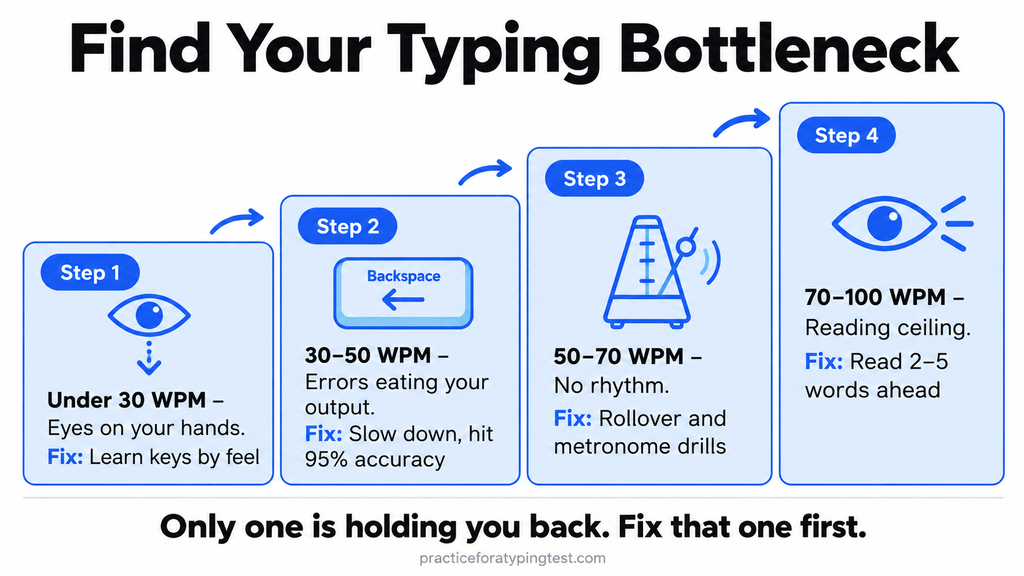
Under 30 WPM – Your Eyes Are on Your Hands
Every time you glance down, you lose the thread of what you’re writing and pay to find your place again. Nothing else matters at this stage.
Not your keyboard, not drills, not shortcuts. Learn the key positions by feel and this number roughly doubles on its own. Most people cross 40 WPM within two to three weeks of daily practice once they stop looking down.
30-50 WPM – Errors Are Eating Your Output
You can find the keys without looking, but your finished speed doesn’t match how fast your fingers actually move. That gap is backspace.
Slow typists lose most of their time spotting mistakes and repairing them, not pressing keys – a finding that holds across the largest typing study ever run, covering 136 million keystrokes from 168,000 people.
If your accuracy sits below 95%, that’s your entire problem. Deliberately type slower until accuracy climbs, then let speed return on its own.
50-70 WPM – No Rhythm
Your hands are accurate but jerky. You fly through familiar words, then stall on anything unusual. Two things cause this: pausing at word boundaries, and letter pairs that force one finger to make two moves in a row.
Words like minimum, deed, and swerve punish you here. This is the tier where technique – rolling and alternate fingering, covered next in this post – starts to matter more than practice volume.
70-100 WPM – You’ve Hit a Reading Ceiling, Not a Finger Ceiling
Your fingers can go faster. Your eyes can’t feed them fast enough. If you’re reading the word you’re currently typing, your reaction time sets your speed.
Fast typists read two to five words ahead and use that buffer to pace themselves – accelerating through easy stretches, preparing for awkward punctuation before it arrives. This is a trainable habit, and it’s the single change that moves people past 90.
The Foundation: Touch Typing Without the Myths
Touch typing means one thing: your fingers know where the keys are, so your eyes never leave the screen. That’s the whole definition. Everything else people attach to it is optional.
Set up your hands like this. Left fingers on A, S, D, F. Right fingers on J, K, L and the semicolon. Both index fingers should feel a small raised bump on F and J – that ridge exists so you can find home position without looking.
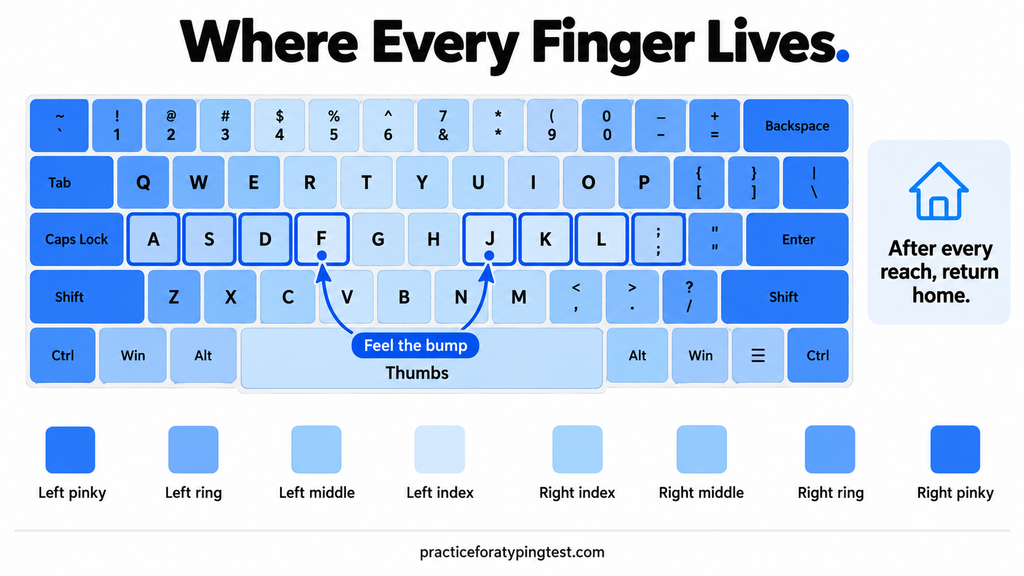
Thumbs rest on the space bar. Pinkies handle Shift, and you use the opposite pinky from the letter you’re capitalising, so a capital T comes from the right pinky pressing Shift while the left index hits T.
Each finger owns a column of keys, and after every reach the finger returns home. That return is the part beginners skip, and it’s why they drift and lose their place.
How Much Training?
Retraining will make you slower before it makes you faster. One typist who documented the switch dropped from 72 WPM to about 55 while relearning finger placement.
That’s normal, and it’s the reason most people quit in week one – they feel incompetent at something they could already do, and they go back to their old habits.
Give it two weeks. Nearly everyone who pushes through that dip comes out the other side faster than where they started.
Touch Typing Myth
One myth worth killing: you don’t need all ten fingers. The largest typing study ever conducted, covering 136 million keystrokes from 168,000 people, found something surprising – people who had taken a formal typing course typed at similar speeds to those who never had, made similar errors, and did it with fewer fingers.
Modern keyboards need so little force that self-taught typists using six or eight fingers can match trained touch typists, which simply wasn’t true in the typewriter era.
So the goal isn’t textbook form. The goal is consistency. If you always use the same finger for the same key and you never look down, you’ve got what matters. Fixing a slightly unorthodox but consistent habit is rarely worth the disruption.
Where to practise this stage: any structured course that introduces keys gradually rather than throwing the full keyboard at you on day one. Twenty minutes a day, and expect to reach 40 WPM in two to three weeks.
Accuracy First, Speed Second
This is the part almost everyone gets backwards. People try to type faster by typing faster, hit a wall of typos, and conclude they’ve reached their limit.
Look at what a mistake actually costs you. When you mistype a letter, you notice it, stop, find the backspace key, delete, retype, and pick up your rhythm again.
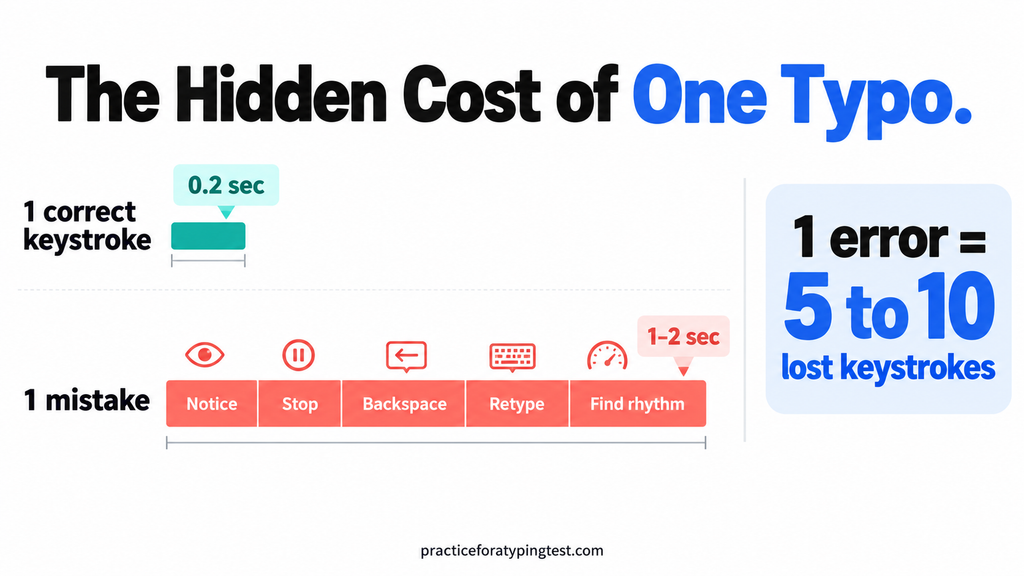
That’s rarely under a second, and it’s often two. Meanwhile the keystroke you got wrong took a fifth of a second. One error wipes out five to ten correct keystrokes.
Run the numbers on a full minute. Type 100 WPM at 90% accuracy and you’re spending roughly six seconds of every minute repairing mistakes.
Your effective output – the words that actually survive – lands well below the number on screen. Push accuracy to 98% and almost all of that time comes back to you, without your fingers moving any faster.
This is why a steady 70 WPM at 98% beats a jumpy 85 at 90% on real work. It’s also considerably less tiring across a working day.
What You Should Do?
So here’s the drill. For the next two weeks, type at roughly 80% of your maximum comfortable speed and refuse to accept anything under 95% accuracy.
It will feel like going backwards. It isn’t – you’re rebuilding the motor pattern without the errors baked in. Once 95% is automatic, let the speed climb back on its own. It will, and it’ll come back cleaner.
One pattern worth watching while you do this: errors cluster on the first letter of a word far more than chance would predict. If your mistakes feel random, they probably aren’t. Watch your word starts.
Build Rhythm
Once your accuracy holds at 95%, the next wall is smoothness. You’re not making many mistakes, but your typing sounds like a car stalling. It goes fast, stops, fast, stops.
The same 168,000-person study explains why. The fastest typists weren’t hitting keys harder or in faster bursts. The gaps between their keystrokes were more even.
They also did something most slow typists never do. They pressed the next key before letting go of the last one.
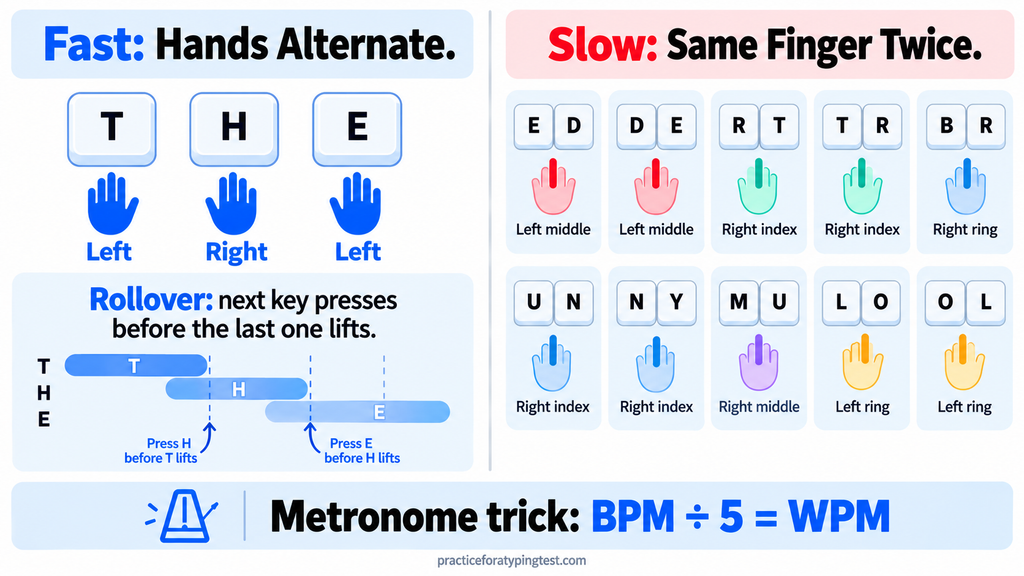
That’s called rollover, and it’s the closest thing typing has to a secret technique.
Try it on the word the. Your left index lands on T, and before it lifts, your right index is already coming down on H. The keys overlap by a fraction of a second. It feels less like three taps and more like one rolling motion.
This works best when your hands alternate. Words like the, and, for, and hand bounce left-right-left, so one hand is always getting ready while the other one types. That’s why they feel effortless.
The words that slow you down do the opposite. Some make one finger do two jobs in a row:
- ed / de – left middle finger, twice
- rt / tr / br – left index, twice
- un / ny / mu – right index, twice
- lo / ol – right ring finger, twice
There’s no rollover possible there. The finger has to finish one key before it can move to the next. That’s the stall you feel on minimum and swerve.
How Do You Actually Train Rhythm?
Use a metronome. Seriously.
Set one to a pace where every beat is one keystroke. Here’s the math: divide the BPM by five and you get your WPM. So 200 BPM is 40 WPM, and 300 BPM is 60 WPM.
Start 20 BPM below your current speed. Type one character per click, including spaces, and don’t let any key come early or late. When it’s easy for three sessions in a row, add 10 BPM.
It feels strange for about four days. Then you’ll notice your normal typing has stopped stalling.
Don’t Pause Between Words
The second rhythm killer is the space bar. Most people treat every word as a separate task: type it, pause, think, start the next one.
Fast typists treat the space as the first letter of the next word. The thumb comes down and the next finger is already moving.
Practise the most common two-word pairs until they feel like one word: of the, in the, to be, it is, and the, on the. You’ll type these thousands of times a week, so the time you save adds up quickly.
Stop Reading the Word You’re Typing
This is the 70+ WPM problem, and it’s the one nobody talks about.
At this level your fingers are ready. They’re just waiting for instructions. If your eyes are on the word you’re typing right now, your fingers can only go as fast as you can read, understand, and react to each word, one at a time.
Fast typists keep their eyes two to five words ahead. While your fingers finish probably, your brain has already loaded wasn’t going to work.
That buffer is what lets you speed through easy stretches and get ready for a comma before you reach it.
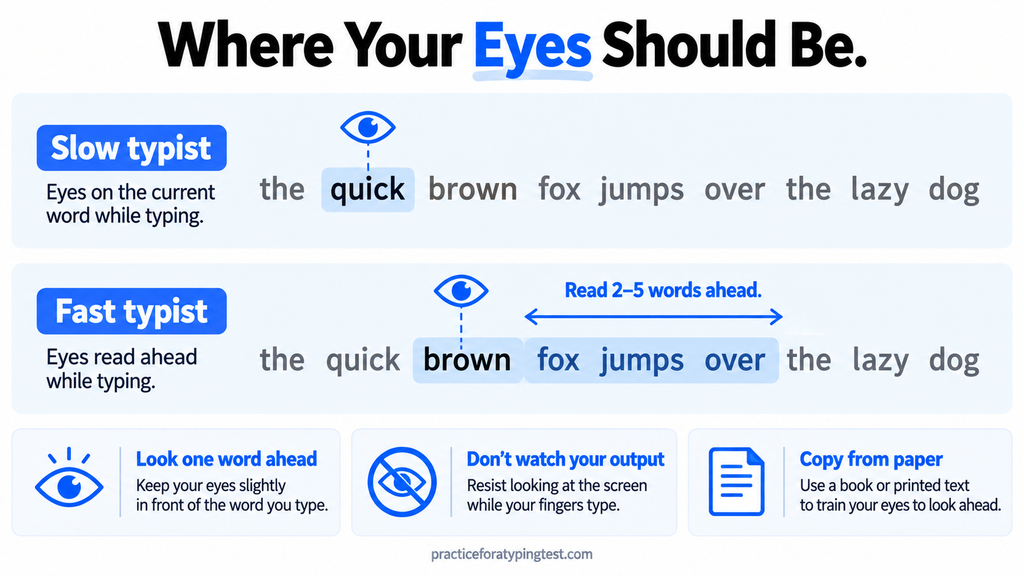
Here’s how to build it.
Look one word ahead on purpose. In every practice session, keep your eyes on the next word, never the current one. It will feel like juggling for a week. That’s the point.
Stop watching what you’ve typed. A lot of people who “never look at the keyboard” spend the whole test staring at their own output, checking each letter as it appears. That’s looking down in a different place. Keep your eyes on the source text.
Try the stop test. Type a passage and stop at a random moment. Without looking, say the next few words out loud. If you can only name one, your buffer is too short. Aim for three.
Copy from paper. Put a printed page next to your screen and type from it. Your eyes can’t keep jumping back to check your output, so they learn to stay on the source.
This habit takes most people about a month to build. It’s also the one that finally gets them past 90.
Your 15-Minute Daily Practice Plan
Remember those two to three months from 40 to 70 WPM? This is how you spend them. Fifteen minutes, every day, split three ways.
Minutes 0–3: Warm up slowly. Type common words at an easy pace and aim for 100% accuracy. The 100 most common words make up about half of everything written in English, so this is never wasted time.
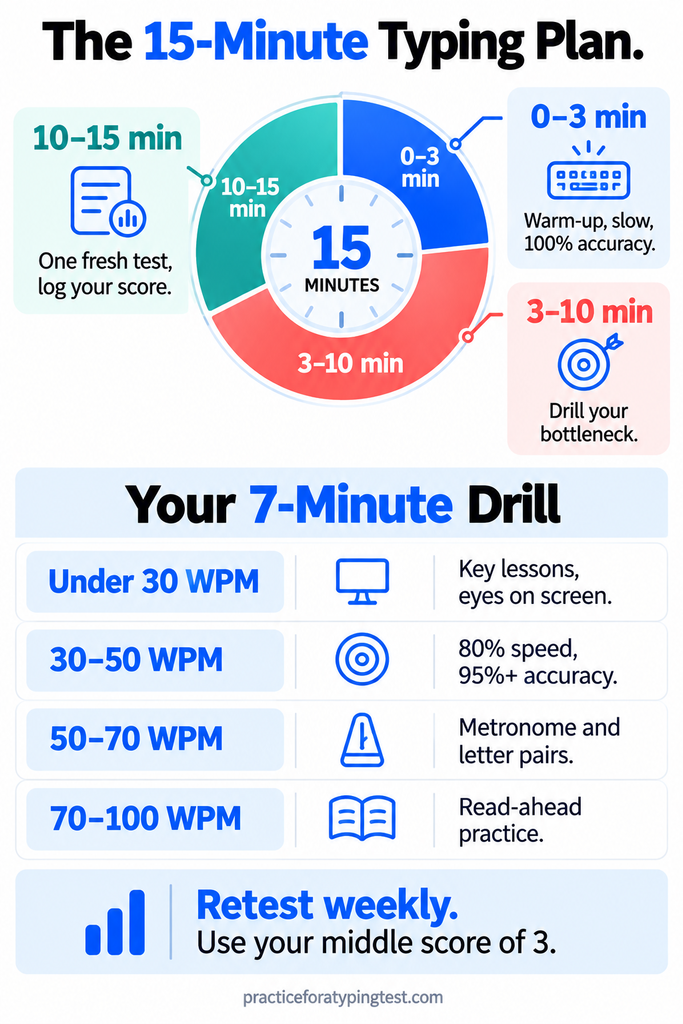
Minutes 3–10: Work on your bottleneck. Only yours. Pick your drill from the table below.
Minutes 10–15: One fresh test. Use new text, write down your WPM and accuracy, and stop there. Don’t take ten tests chasing a good number.
| Your speed | Your 7-minute drill |
| Under 30 WPM | Key-position lessons, eyes on screen, no exceptions |
| 30–50 WPM | Type at 80% speed, restart any line that drops under 95% accuracy |
| 50–70 WPM | Metronome typing, same-finger pairs, common two-word pairs |
| 70–100 WPM | Read-ahead practice on long, unfamiliar passages |
Once a week, at the same time of day, run the three-test benchmark from the start of this guide and use the middle score. That’s your real number. Daily scores go up and down too much to mean anything.
Take the free typing test → and log your number today.
Why Your Speed Suddenly Stops Moving?
Every typist gets stuck on a plateau. You’ll improve steadily for three weeks, then sit at the same number for ten days straight.
That’s not your limit. It usually comes from one of three things.
You’re typing text you’ve memorised. If you keep practising the same passages, your fingers learn those passages, not typing. Switch sources: news articles, book excerpts, quotes, even emails you’ve already sent.
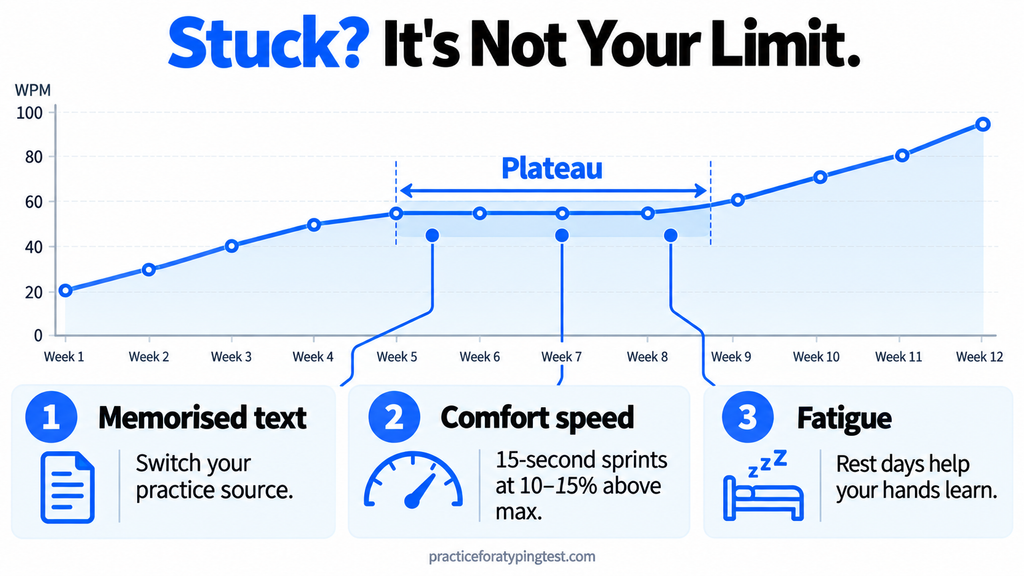
You only practise at a comfortable speed. Comfort keeps you where you are. Once a day, do three 15-second sprints about 10-15% above your top speed.
Let the errors happen. Then drop back to normal pace. Your usual speed will suddenly feel slower and easier.
You’re tired. Your hands learn movements between sessions, not just during them. Five focused days with two off will beat seven tired days every time.
So When Is It Actually Your Limit?
Probably not before 90–100 WPM. Most people who say they’ve hit their ceiling have only hit the ceiling of the drill they’ve been repeating. Change the drill and the number usually starts moving again.
Does Your Keyboard Actually Matter?
Less than the internet wants you to believe.
A mechanical keyboard feels nice, but it won’t add 20 WPM. A cheap laptop keyboard will do fine until you’re well past 70. Buy a new keyboard because you’ll enjoy it, not because you think it’s what’s slowing you down.
Your posture matters more. Here’s what to check:
- Elbows bent at roughly 90 degrees, close to your sides
- Wrists floating above the keyboard, not resting or bent upward
- Screen at eye level, so you’re not looking down, which pulls your eyes toward your hands
- Feet flat on the floor
What about switching layouts to Dvorak or Colemak? Some people love them. But the switch costs weeks or months of being slower, and the speed gain is small compared to fixing your actual bottleneck. For most people, it’s not worth it.
FAQs
How long does it take to go from 40 to 60 WPM?
About six to ten weeks at 15 minutes a day, as long as you’re working on the right bottleneck. For most people at 40, that bottleneck is accuracy.
Is 60 WPM good?
Yes. It’s comfortably above the global average and clears the bar for most office and data-entry jobs. For everyday work, going past 70 matters less than keeping your accuracy high.
Does typing on my phone help?
No. It’s a completely different motor skill. It won’t hurt your keyboard speed, but it won’t help it either.
Is it ever okay to look at the keyboard?
For rare symbols you use once a month, sure. For letters, never. Every glance down teaches your brain that it’s allowed to depend on your eyes.
Am I too old to learn touch typing?
No. Adults learn it all the time. You’ll just go through that two-week slump more consciously than a teenager would. Push through it the same way.
So What Should You Do Today?
Take a test. Find your tier. Practise that one thing.
If you’re under 30, stop looking down. From 30 to 50, slow down until your accuracy passes 95%. From 50 to 70, get a metronome and learn to roll through keys. Above 70, keep your eyes on the words ahead, not the one you’re typing.
Fifteen minutes a day. One bottleneck at a time. Check your number once a week.
You’re not slow. You’re just about to start practising the right thing.

1 comment